Crypto wallets

When you step into the world of crypto, one of the first things you need is a good wallet. Crypto wallets are like your bank account for digital money, but they come in many types and with different levels of security. This guide will help you understand how to pick the right one. We’ll look at types, security features, ease of use, extra functions, support, and a checklist to make your choice easier. By the end, you’ll know what to look for in crypto wallets to keep your assets safe and make your life simpler.

Crypto wallets stores your private keys, which are like passwords to your coins. Without a secure wallet, you risk losing everything to hackers or mistakes. That’s why security is key. But it’s not just about safety, you also want something easy to use. Let’s dive in.

Types of Crypto Wallets: Custodial vs. Non-Custodial

First, you need to know the main types of crypto wallets. There are two big categories: custodial and non-custodial. Each has its own pros and cons, depending on what you need.

Custodial wallets are managed by a third party, like an exchange. Think of places like Binance or Coinbase. They hold your private keys for you. This means you don’t have to worry about losing your keys, the exchange takes care of it. It’s great for beginners because it’s simple. You just sign up, and you’re ready to go.

But there’s a downside. Since someone else controls your keys, you’re trusting them. If the exchange gets hacked or goes bankrupt, your crypto could be gone. Remember the FTX collapse? Many people lost their money because it was custodial. On the plus side, custodial wallets often have insurance for hacks, and recovery is easier if you forget your password.

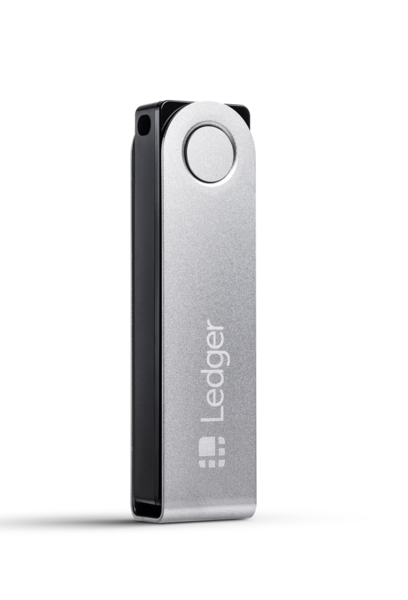
Non-custodial wallets, on the other hand, give you full control. You hold your own private keys, so no one else can access your funds without your permission. Examples include MetaMask or Ledger hardware wallets. This is more secure in terms of ownership, “not your keys, not your crypto,” as they say.

The minus here is responsibility. If you lose your seed phrase (a backup code), your money is lost forever. No customer service can help. But for people who want true decentralization, this is the way. Non-custodial wallets are better for long-term holding or if you don’t trust big companies.

So, when to choose which? If you’re new and trading often on exchanges, go custodial. For serious investors who want control, non-custodial is safer.

9.6
  • Up to 100x leverage on futures
  • 800+ cryptocurrencies supported
  • Simple and low trading fees
  • Earn interest with ByBit Earn
  • Launchpad access to new tokens
Trade and grab your share from a 1,000,000 USDT prize pool!
  
9.5
  • Decentralized
  • Great for leverage
  • Low fees
4% discount on your fees
  
9.3
  • Non-custodial & no KYC required
  • Lightning-fast trades on Layer 2
  • No sign-up, just connect your wallet and go
  
9
  • Worlds largest crypto exchange
  • Great eco system
  • Free crypto debitcard
  
9
  • Partner with the UFC
  • Big variety of crypto
  • Debit card
  • Easy to use
Up to 1 BTC in rewards
  
8.5
  • Easy-to-use app
  • Great for beginners
  • Low fees
💰💰 Great for staking your crypto 🤑🤑
  
8
  • Listed on NASDAQ
  • Easy to use
$10 worth of bitcoin
  
Special terms and conditions apply
8
  • Decentralized
  • No KYC
  
8
  • No KYC required
  • Low fees
  • Withdrawal 2 BTC per day without KYC
  
7
  • Fouded by the Winklevoss brothers
  

Hot Wallets vs. Cold Wallets: When to Use Each

Another way to split crypto wallets is hot vs. cold. This is about how connected they are to the internet.

Hot wallets are online all the time. They’re apps or browser extensions, like Trust Wallet or Exodus. They’re convenient for daily use, sending, receiving, or trading crypto quickly. If you buy NFTs or use DeFi apps, a hot wallet is handy.

But being online means more risk. Hackers can try to get in through phishing or malware. That’s why hot wallets are best for small amounts, not your life savings.

Cold wallets are offline. They’re hardware devices like Trezor or even paper wallets. No internet connection means no remote hacks. Perfect for storing large amounts long-term.

The con? They’re less convenient. To send crypto, you need to connect them to your computer, which takes time. Also, hardware costs money, around $50 to $200.

When do you need which? Use hot wallets for everyday stuff, like buying coffee with crypto. Cold for savings you don’t touch often. Many people use both: hot for spending, cold for storage.

8.6
  • Supports 5,500+ assets
  • Secure Element EAL5+ chip
  • Bluetooth and USB connectivity
  
8.5
  • Only $149
Get $10 off
Get $10 off
  

Key Security Components to Compare in Crypto Wallets

Security is the heart of crypto wallets. Let’s break down what to look for.

First, two-factor authentication (2FA). This adds a second step to log in, like a code from your phone. Most good wallets have it; Google Authenticator or SMS. It stops hackers even if they have your password. Always turn it on.

Next, seed phrases and backups. A seed phrase is 12-24 words that recover your wallet if your device breaks. Non-custodial wallets use this. Store it offline, maybe in a safe. Never share it! Backups should be automatic or easy to set up.

Multisignature (multi-sig) is advanced. It needs multiple approvals to send funds, like two keys for a safe. Great for businesses or shared accounts. Wallets like Electrum support it. It boosts security but can slow things down.

Hardware integration means connecting to a physical device. Software wallets like MetaMask can link to Ledger for extra safety. This way, your keys stay offline.

PIN or biometric protection: A PIN code or fingerprint/face ID. Hardware wallets use PINs, mobiles use biometrics. It prevents theft if someone steals your device.

Compare these when picking crypto wallets. A wallet with all might be overkill for small users, but for big holders, it’s must-have.

Usability: Setup, Interface, and Compatibility

A secure wallet is useless if it’s hard to use. Usability matters a lot.

Easy setup is key. Some wallets take minutes – download app, create account, done. Others, like hardware, need more steps: plug in, set PIN, write seed. For beginners, look for simple ones.

The interface should be clean. Good crypto wallets have intuitive designs, like clear buttons for send/receive. Avoid cluttered ones that confuse you.

Compatibility is huge. Does it support your coins? Bitcoin, Ethereum, or altcoins like Solana? Multi-chain wallets like Atomic Wallet handle many blockchains. Check if it works with your phone, computer, or both.

Bad usability leads to mistakes, like sending to wrong address. Test a wallet with small amounts first.

Integrated Functionality: Swaps, Staking, and DApp Access

Many crypto wallets do more than store. They have built-in features that affect security and user experience.

Swaps let you trade coins inside the wallet, no need for exchanges. Convenient, but watch fees and security, it connects to DEXs, which can have risks like smart contract bugs.

Staking: Earn rewards by locking coins. Wallets like Ledger Live support it. It improves UX for passive income, but staking means your coins are online longer, slight security trade-off.

DApp access: Connect to decentralized apps for gaming, lending, etc. MetaMask is king here. It opens the Web3 world, but more connections mean more phishing risks. Always verify sites.

These features make wallets more useful, but balance them with security. If you don’t need them, a basic wallet is safer.

Support and Community: Help When You Need It

Even the best crypto wallets can have issues. Good support is vital.

Look for a help center with FAQs, tutorials, and chat. Exchanges like Coinbase have 24/7 support. Open-source wallets might rely on community forums.

An active community means faster fixes. Check Reddit or Discord for the wallet, are people helpful? Regular updates show the team cares about security patches.

Without support, you’re stuck if something goes wrong. Prioritize wallets with strong backing.

8.6
  • Supports 5,500+ assets
  • Secure Element EAL5+ chip
  • Bluetooth and USB connectivity
  
8.5
  • Only $149
Get $10 off
Get $10 off
  

Checklist for Choosing Your Crypto Wallet

Here’s a quick reference to help you decide. Split into must-have and nice-to-have.

Must-Have Features:

  • Strong security: 2FA, seed phrase backup, and PIN/biometrics.
  • Non-custodial for control, or custodial with insurance.
  • Compatibility with your main cryptocurrencies.
  • Easy-to-use interface to avoid errors.
  • Offline option (cold) for large holdings.

Nice-to-Have Features:

  • Multi-sig for extra protection.
  • Integrated swaps and staking for convenience.
  • DApp support if you’re into Web3.
  • Active community and frequent updates.
  • Hardware integration for hybrid use.